
How to check that your ad actually ran in a live stream
Blog/Formats
What is Stream Takeover: the ad frame around a live stream
A viewer is watching a streamer play. The picture smoothly shrinks to about 80% and slides into the top-left corner, a brand panel appears on the right and a banner runs along the bottom. The game, the camera and the chat keep going, and afterwards the picture returns to full size. That is Stream Takeover: the brand gets a large part of the screen, and the viewer never loses the broadcast they chose. Platform ads run in an ad break or over the stream and interrupt viewing; Stream Takeover runs inside the stream and doesn't stop it.
How Stream Takeover looks, step by step
An impression has three moments:
- The stream shrinks. The picture scales down to about 80% and moves to the top-left corner, still playing in the same proportions.
- The brand takes the frame. An L-shaped area opens up on the right and along the bottom. The side panel and the bottom banner carry your message, video or offer.
- The stream returns. After the impression the picture goes back to full screen. The link stays in chat.
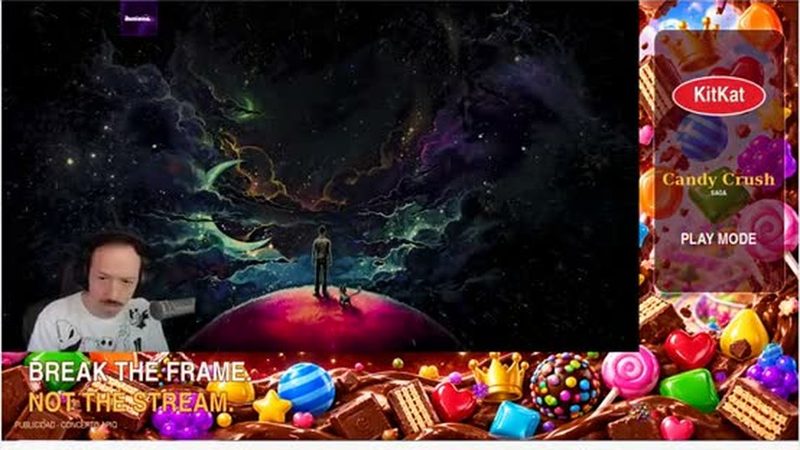
The streamer connects APIQ's ad layer once in their broadcasting software, such as OBS, and the platform shows the creative. Because the ad becomes part of the video stream, it is visible on any platform and device, ad blockers don't remove it, and it stays in the recording. Views of recordings come free, though they add only a few percent to volume. The streamer can't change the creative; if the layer is switched off, those impressions don't count.
Stream Takeover creative specs: the 1920×1080 template
The zone sizes follow from the 80% scale: 80% of 1920 is 1536, and 80% of 1080 is 864. The stream occupies 1536×864 in the top-left corner; the rest belongs to the brand.
| Zone | Size, px | Position | Share of the screen |
|---|---|---|---|
| Canvas | 1920×1080 | Whole screen | 100% |
| Stream, scaled | 1536×864 | Top left | 64% |
| Side panel | 384×1080 | Right, full height | 20% |
| Bottom banner | 1536×216 | Under the stream | 16% |
Together the two zones cover 36% of the screen, and the stream keeps its 16:9 proportions, so nothing in the picture is cropped. What follows for the creative:
- One frame, not two ads. The tall, narrow panel and the long, low banner meet in the bottom-right corner, so design them as one frame. In the demo, the panel carries the brand marks and the banner the tagline.
- Video fits. Video in the frame runs up to 30 seconds, and a ready TV spot works; the static parts of the frame are designed on the template.
- No QR code in the artwork. The platform generates and inserts QR codes itself, so there are no separate versions to prepare.
- Labeling. The demo carries a small advertising label in the banner. Agree with the seller on how ads are labeled in each market.
- The rest comes with the media plan, including file formats. No creative yet? APIQ can help.
Stream Takeover doesn't cut into the stream. The stream gets smaller, and the brand gets the frame around it.
Want to see a media plan for your brand?
Get a media planStream Takeover vs banner, full-screen video and poll
All formats share the click slots and verification; they differ in how the stream and the brand split the screen.
| Banner | Full-screen video | Poll | Stream Takeover | |
|---|---|---|---|---|
| The stream during the ad | Full size; the banner takes one edge | Covered by the video | Full size; the question appears over it | Keeps playing at about 80%, not covered |
| The brand's space | A strip along one edge or a side banner on a third of the screen | The whole frame | Question and answers, then a video | Side panel and bottom banner, 36% of the screen |
| Duration | 20 seconds | Up to 30 seconds, no skip | Voting, then the brand video | Video in the frame up to 30 seconds |
| Creative | Banner artwork; the streamer picks a position that doesn't cover the camera or game | A ready TV or online spot | Question, answers, video | The 1920×1080 template |
Stream Takeover gives the brand more space than a banner, and unlike full-screen video it keeps the stream visible. Rich media, a full-screen layer with transparent zones, suits animation. Formats can be combined in one campaign.
Clicks and measurement
The format is clickable, and the link is duplicated in chat. It has three click slots, as every APIQ placement does:
- Chat link, about 80% of clicks. It appears in chat while the ad is on air; on Twitch, with an Announcement.
- QR code, about 10%. Generated automatically. Smart TV viewers can't click, but they can scan it with a phone.
- On-screen click, about 10%. Viewers click the ad right in the stream.
The split is an average across campaigns on the platform, not a Stream Takeover measurement. For Stream Takeover the chat link matters just as much: when the frame closes, the stream returns to full screen and the link stays in chat. More in Where clicks come from.
The system screenshots every view and uses computer vision to check the creative's presence, position and clickable elements; the viewer count is recorded at the moment of display. On Twitch and Kick it also checks that the chat link is posted and pinned. Anti-fraud checks audience quality on 15 parameters and excludes suspicious traffic from the report and the invoice. You pay only for verified views, where the creative was shown in full.
The online report shows verified views, CTR, QR scans, chat-link clicks, results by creative and streamer, and a screenshot of every view. Read the total CTR first, since on-screen clicks alone account for only about a tenth of all clicks; then compare creatives, because different creatives on different streamers give an A/B test; then check your own attribution (AppsFlyer, Adjust, UTM tags, pixels). On Twitch, impression pixels are accepted, so conversions count after a view as well as after a click. A streamer whose CTR drops below the agreed threshold is switched off automatically.
When to choose Stream Takeover and how to test it
The format fits launches and product presentations, offers with a QR code or promo code, and awareness across many streams. If the story needs the whole screen, choose full-screen video; for steady presence in a long campaign, a banner.
There are no public campaign figures for Stream Takeover yet: the format is shown on a demo, and none of APIQ's published case studies names it as the format used. Start with a pilot that produces your own numbers.
- Creative. Two or three versions on the 1920×1080 template, to compare across streamers.
- Setup. Per streamer: frequency (for example every 15, 20 or 30 minutes), time of day and order of creatives. Category exclusivity for the period, if competitors matter.
- Timeline. The media plan arrives within 24 hours; launch follows 1–2 days after the streamer and creative list is approved.
- What to check. Verified views against plan, CTR in total and by slot, CTR by creative and streamer, screenshots of the frame, and conversions in your own attribution.
Before you buy, ask the seller:
- Which streamers will run the frame, and can I remove any of them during the campaign?
- What does a verified view of Stream Takeover require, and what does its screenshot show?
- Is the chat link pinned on every channel while the frame is on air, and who checks it?
- Will I see clicks split by chat, QR code and screen, for each creative and streamer?
- Which CTR threshold switches a streamer off, and can frequency change mid-campaign?
The full spec is on the Stream Takeover page. Screenshots also show what surrounded the frame on air; how brands control that context is in Brand safety in live streams. APIQ campaigns can run on Twitch, Kick, YouTube Live and TikTok Live in Spain, Turkey, Germany, the UK and the US.
Read next